Where do people click?
Check whether recorded clicks cluster around a product option, an image or a control. A cluster can suggest a useful review target, but repeated clicks may be legitimate.
 by Plugins.shop Get ClickClue Free
CLICKCLUE PRO · WORDPRESS HEATMAPS
A product detail can be present and still be hard to find. ClickClue Pro puts recorded click positions and scroll reach into page context, so you can choose which part of the experience to investigate.
Heatmaps require Pro, installed alongside Free. Recordings and eligible design snapshots stay on your WordPress server.
AN ACTUAL RECORDED-PAGE OVERLAY
The warmer area beside the size guide marks recorded clicks. That is a useful place to start a review; it does not show whether the guide was helpful or whether a purchase followed.
The overlay is reconstructed from a saved page, not a screen video. Fonts, blocked media and dynamic layouts can affect its appearance.
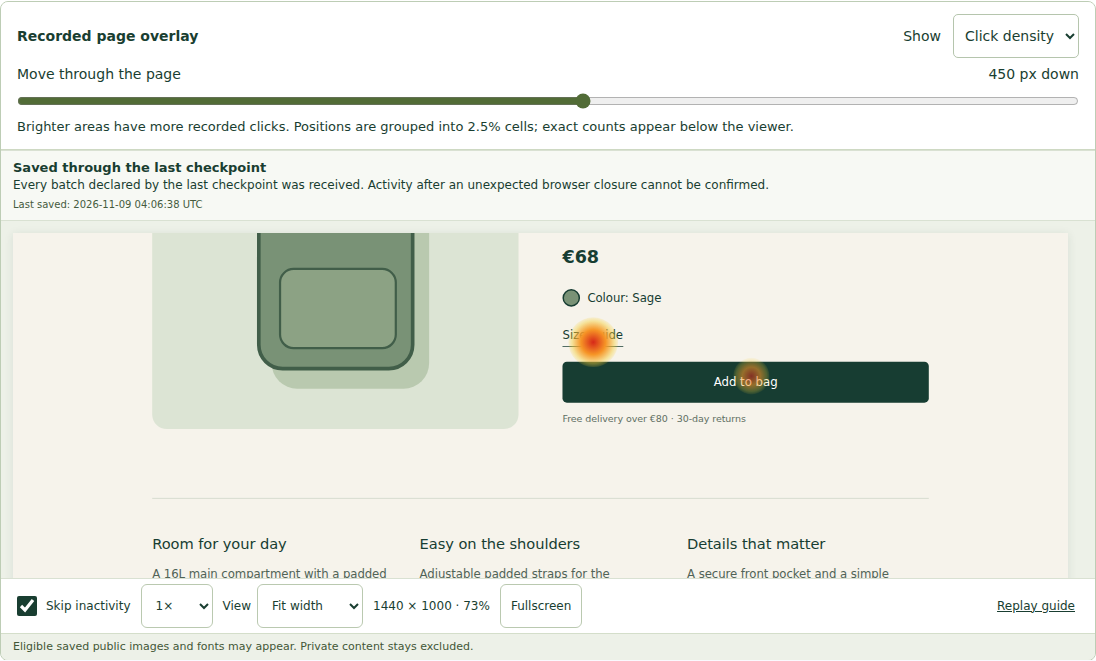
Check whether recorded clicks cluster around a product option, an image or a control. A cluster can suggest a useful review target, but repeated clicks may be legitimate.
Use scroll reach to investigate whether a contact section, delivery note or specification lies beyond the observed depths. Reaching a section does not establish that it was read.
Choose the page, viewport group and recorded layout before interpreting an overlay. Keep desktop, mobile and materially different layouts separate.
Start with one page and one question: for example, whether the delivery information is easy to reach on mobile. Select a relevant date range and viewport, inspect the sample counts, then compare the observed positions with a signed-out visit to the current page.
Open representative recordings before writing a finding. Record what you saw, what you could not observe, and the next check. If the page changed during the period, review its layouts separately instead of treating them as one design.
Private regions and excluded visits do not contribute the same evidence as eligible captured content. A sparse view can mean limited coverage; it is not proof that a section never receives attention.
Free records and replays visits, with filters, bookmarks and notes. Pro adds heatmaps, form observations, journeys and team investigations. Both use your own hosting.
Yes, with appropriate date, device and layout scope. Keep the sample sizes and capture conditions visible. A before-and-after difference does not establish that the edit caused it.
It supplies recorded evidence to investigate. Ask a test participant to complete the task, check the live control and use other evidence when you need to understand the reason behind a behaviour.